
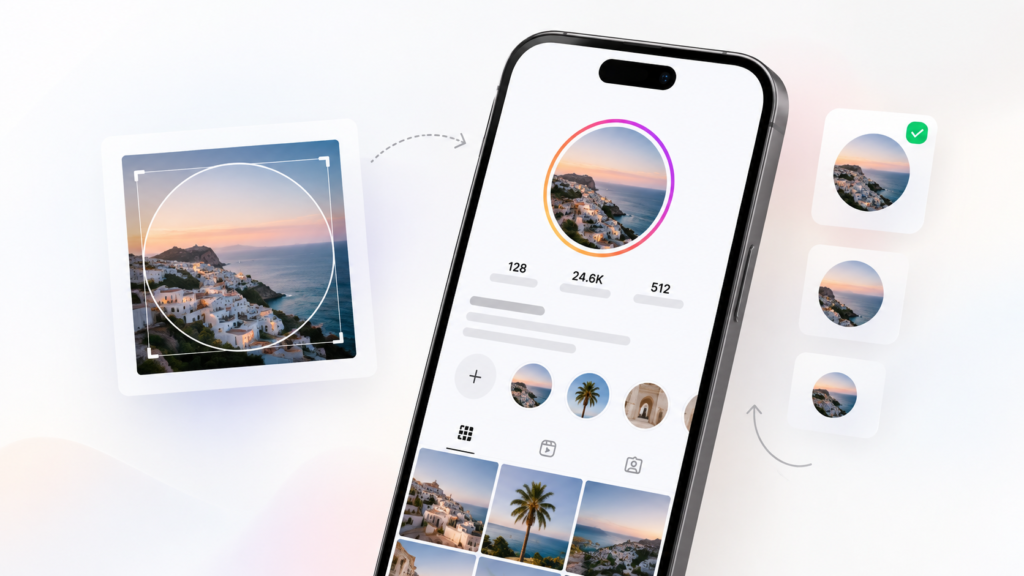
See how your profile picture will look on Instagram before you upload it.
With our free Instagram PFP Viewer, you can upload your photo, adjust the position and instantly preview how it will appear inside an Instagram-style circular profile picture.
Use the tool below to test your photo before making it your Instagram profile picture.
See exactly how your profile picture will look
Upload once, adjust the crop and preview your photo inside the selected social app before you publish it.
Drag directly on the profile image to reposition it. Use the rotation slider for precise free rotation.
🔒 Your image is processed privately on your device and is never uploaded.
Preview Your Instagram Profile Picture Before Uploading
Instagram displays profile pictures inside a circular frame. Because of this, parts of a square or rectangular photo can be cropped out.
A photo may look perfect in your gallery but look completely different once it appears as a small Instagram profile picture.
Our Instagram PFP Viewer helps you check the crop before uploading your image.
- Your face is centered
- Your logo remains visible
- Important details are not cut off
- Your photo still looks clear at a smaller size
- The image works well inside a circular profile picture
How to Use the Instagram PFP Viewer
- Upload your photo.
- Adjust the position or crop if needed.
- Preview your photo inside the circular Instagram-style frame.
- Check how your profile picture looks at a smaller size.
- Make any final adjustments before uploading it to Instagram.
You can test different photos until you find the one that looks best.
Want to compare your profile picture outside Instagram as well? Use our general PFP Viewer to preview the same image in multiple platform-style layouts.
Why Use an Instagram PFP Viewer?
Your Instagram profile picture is one of the first things people see when they visit your profile.
On Instagram, the image is displayed very small and inside a circle. This means details near the edges of your image may disappear.
Previewing your profile picture first can help you choose a better crop and avoid uploading a photo that does not look the way you expected.
Our Instagram PFP Viewer gives you a quick way to test your picture before changing your real Instagram profile.
Instagram Profile Picture Tips
Keep the Main Subject in the Center
Instagram crops profile pictures into a circle. Keep your face, logo or main subject near the center of the image so it stays visible.
Avoid Important Details Near the Edges
Anything close to the corners of the original image may disappear after the circular crop.
Use a Clear Photo
Profile pictures appear relatively small on Instagram. A sharp and clear photo usually works better than an image with lots of tiny details.
Use Good Contrast
Make sure your face, logo or subject stands out clearly from the background.
Check the Small Preview
A photo can look good when enlarged but become difficult to recognize as a small profile picture. Always check the smaller preview before uploading.
Want to compare your Instagram photo with other platforms too? Try our PFP Simulator or use the PFP Checker to review image quality and crop balance.
Instagram PFP Viewer for Profile Photos and Logos
- Personal profile photos
- Creator profile pictures
- Business profile photos
- Brand logos
- Gaming profile pictures
- Photography accounts
- Theme pages
- Online shop profile pictures
Simply upload the image you are considering and check how it looks inside the Instagram-style profile picture frame.
Want to see how the same profile picture looks beyond Instagram? Use our PFP Simulator to compare your image across multiple platform-style previews at once.
Test Different Instagram Profile Pictures
Not sure which profile picture to use?
Try uploading several different photos and compare how they look.
A good Instagram profile picture should remain recognizable even when displayed at a small size.
You may find that a close-up portrait works better than a full-body photo, or that a simpler logo works better than a detailed design.
Testing your profile picture beforehand makes it easier to choose.
Free Instagram Profile Picture Preview
You can use the Instagram PFP Viewer to preview your photo before uploading it to Instagram.
There is no need to change your actual Instagram profile picture just to see how a new image might look.
Upload your image, preview the circular crop and make your adjustments first.
For a broader preview experience, see our Instagram Profile Picture Preview.
Helpful Profile Picture Guides
More Profile Picture Tools
- Profile Picture Tester
- Instagram Profile Picture Preview
- TikTok Profile Picture Preview
- WhatsApp Profile Picture Preview
- Facebook Profile Picture Preview
- LinkedIn Profile Picture Test
Frequently Asked Questions
What is an Instagram PFP Viewer?
An Instagram PFP Viewer is a tool that lets you preview how a photo may look as an Instagram profile picture before you upload it to your account.
Is the Instagram PFP Viewer free?
Yes. You can use the profile picture viewer to preview your image for free.
Do I need to connect my Instagram account?
No. You do not need to connect or log in to your Instagram account. Simply upload the photo you want to preview.
Can I use the tool on my phone?
Yes. The Instagram PFP Viewer can be used on mobile devices as well as desktop computers.
Why does my Instagram profile picture get cropped?
Instagram displays profile pictures inside a circular frame. Areas near the corners of your original image are therefore not visible.
What should I use as my Instagram profile picture?
Choose an image that is clear, recognizable and easy to understand at a small size. For personal accounts, a clear photo of your face often works well. For business accounts, a simple and recognizable logo can work better.
Can I preview an Instagram logo?
Yes. You can upload a logo and check how it looks inside the circular Instagram-style frame.
Does this tool show my real Instagram profile?
No. The tool creates a preview using the image you upload. It does not access or display your Instagram account.
Is my uploaded profile picture public?
Your uploaded image should only be used to generate your preview and should not be publicly displayed by the tool.
Can I test more than one profile picture?
Yes. You can try different images and compare which one looks best as an Instagram profile picture.